
Best overall: Google Translate. Best for shared conversations: Microsoft Translator. Best for iPhone users: Apple Translate. Best for preparing typed symptom notes: DeepL. These are the best apps to translate medical symptoms abroad in 2026 by travel use case—not substitutes for a medical interpreter or an English-speaking clinician.
- Google Translate leads the best apps to translate medical symptoms abroad for flexible travel communication.
- Microsoft Translator suits shared conversations; Apple Translate suits iPhone users; DeepL suits prepared symptom notes.
- MyAbroadMDs helps travelers prepare with curated English-speaking doctor directories, not medical translation or insurance.
- Use short symptom statements, preserve medication names, and request professional interpretation for consequential medical decisions.
Why this matters
A translation app helps you explain where something hurts, when it started, and what medication you take. It does not establish a diagnosis. A sentence that sounds fluent can still change an important detail, including whether you have an allergy or have already taken a medicine.
For your 2026 itinerary, prepare both a communication tool and a way to find care. MyAbroadMDs provides personalized, curated directories of English-speaking doctors and healthcare providers across 100+ countries. It is a pre-trip healthcare preparation membership—not insurance, telehealth, or a booking service.
MyAbroadMDs is best for travelers who want an English-speaking doctor directory prepared before departure. A translation app serves a different purpose: helping you communicate when you do not share a language with the person in front of you.
Before you pack, build that distinction into your plan. Translation helps with words. A clinician evaluates symptoms. Insurance addresses coverage according to its policy.
What makes the best medical symptom translation app
For this 2026 shortlist, prioritize the conversation you need to have rather than the longest feature list.
- Destination-language support: Confirm that the app supports the language you need in the specific mode you intend to use. Text, speech, and offline support are not interchangeable.
- Visible text: A written translation gives the clinician something to read and lets you retain the original wording beside it.
- Conversation handling: Voice input helps with exchanges, but background noise and unclear pronunciation add opportunities for mistakes.
- Offline preparation: Download supported language files before departure. Test the actual function you need without a connection.
- Medication fidelity: Keep original medication names, strengths, and instructions available. Do not rely on a translated brand name to identify a medicine.
- Privacy controls: Review what the app sends or stores before entering identifying information or a detailed medical history.
No general-purpose translation app should be your sole interpreter for consent, a diagnosis, or treatment instructions. Choose the app for practical communication, then request qualified language support when the medical decision demands it.
Best symptom translation apps at a glance
| App | Best for | Standout feature | Key limitation |
|---|---|---|---|
| Google Translate | Flexible everyday travel communication | Text, camera, voice, and downloaded-language translation | Language and feature support vary; medical meaning needs confirmation |
| Microsoft Translator | Shared multilingual conversations | Multi-person conversation support | Connected conversation features are not an offline fallback |
| Apple Translate | iPhone users wanting a built-in option | Conversation features within Apple's Translate app | Limited to supported Apple devices and languages |
| DeepL | Preparing written symptom summaries | Typed translation with alternative wording | Alternative phrasing is not clinical validation |
The table compares workflows, not measured medical accuracy. None of these recommendations means an app has been validated to translate your specific symptoms safely.
1. Google Translate: best for flexible travel communication
Google Translate combines typed translation, voice input, conversation features, and camera translation. Downloaded languages support offline translation for supported combinations, making it a practical default when your itinerary includes unreliable connectivity.
For symptoms, start with typed text rather than a long spoken explanation. Keep the original visible, show the translation, and ask the clinician to confirm the essential detail. Camera translation can help you understand surrounding text, but it should not become your only source for medication instructions.
Google Translate pros:
- Several input methods cover different travel situations.
- Downloaded-language translation provides an offline option where supported.
- Written output helps you present a short symptom summary.
- Camera translation helps with printed text without retyping everything.
Google Translate cons:
- Not every language supports every feature or offline function.
- Voice recognition and translation can introduce separate errors.
- A readable result does not establish medical accuracy.
Best for: Travelers who want one general-purpose translation app for varied situations.
Before departure in 2026, test a sentence containing a symptom, a negative statement, and a medication name. Check whether the app preserves each element. This is a preparation exercise, not proof that later translations will be correct.
Verdict: Buy for the broadest mix of travel communication tasks; request professional interpretation for clinical decisions.
2. Microsoft Translator: best for shared conversations
Microsoft Translator supports text and speech translation, including multi-person conversations. Its distinct use case is an exchange involving several participants rather than a single translated note.
That format fits a traveler, a companion, and other people communicating across languages. It does not turn everyone in the conversation into a qualified interpreter. Keep the exchange structured so a clinician can identify which statement belongs to the patient.
Microsoft Translator pros:
- Multi-person conversation support fits shared exchanges.
- Text translation provides a written alternative to speech.
- Speech features help when typing interrupts the conversation.
Microsoft Translator cons:
- Shared conversations depend on participants being able to join and use the feature.
- Connected conversation features do not replace an offline preparation plan.
- Incorrect speech recognition can change the translation before you notice.
Best for: Travelers who need a shared multilingual conversation with a companion or several participants.
Assign speaking turns. State who is describing the symptom, and keep each contribution short. If a companion supplies medical history, ask the clinician to confirm it with the patient rather than treating the translated exchange as verified.
Verdict: Buy for shared conversations; skip this workflow when setup delays urgent care.
3. Apple Translate: best for iPhone users
Apple Translate provides text and voice translation with conversation features on supported Apple devices. Downloaded languages allow supported translation functions without an internet connection.
The appeal is straightforward: iPhone users can prepare within Apple's translation app rather than adopt a separate service. That convenience only matters if the destination language and required functions are supported on the device you will carry.
Apple Translate pros:
- A built-in option for supported Apple devices.
- Conversation features support spoken exchanges.
- Downloaded languages provide an offline route where supported.
Apple Translate cons:
- Device and language support restrict who can use it.
- Offline functions need preparation before you lose connectivity.
- Medical terminology and subtle symptom descriptions still require confirmation.
Best for: iPhone travelers whose destination language is supported and who prefer a built-in translation workflow.
Open Apple Translate before departure and rehearse the complete exchange. Enter your statement, display the translation, and practice switching between languages. Familiarity matters when you are tired or uncomfortable and do not want to learn the interface at reception.
Verdict: Buy for a prepared iPhone workflow; skip it if your required language or function is unsupported.
4. DeepL: best for preparing typed symptom notes
DeepL translates written text and offers alternative wording for supported translations. Its strongest role in this guide is preparing a concise written summary before an appointment, rather than choosing medical terminology during a rushed conversation.
Alternative wording helps you see that a sentence has more than one possible rendering. It does not tell you which version is medically correct. Keep the original sentence available and ask the clinician or interpreter to resolve uncertainty.
DeepL pros:
- Written translation suits a prepared symptom summary.
- Alternative wording helps identify phrasing choices.
- A text-first workflow encourages you to edit the original before translating.
DeepL cons:
- Language support must match your destination.
- A polished sentence can still misrepresent a clinical detail.
- Choosing an alternative without understanding it creates another opportunity for error.
Best for: Travelers preparing short written notes for a non-emergency appointment.
Avoid pasting a long, unedited medical history and assuming the result is ready to hand over. Separate symptoms, existing conditions, allergies, and current medicines. Keep medication information in its original form alongside the translated explanation.
Verdict: Buy for prepared written notes; skip it as your sole interpreter during a medical decision.
How we ranked these apps
This 2026 ranking gives each app a distinct job: Google Translate for varied inputs, Microsoft Translator for shared conversations, Apple Translate for supported iPhone workflows, and DeepL for prepared text.
The criteria are destination-language fit, readable output, conversation handling, offline preparation, medication fidelity, and privacy. This is a workflow-based editorial ranking, not a clinical translation accuracy test. Your destination language can change the right choice: an unsupported language eliminates an otherwise useful app.
Prepare your symptom translation before departure
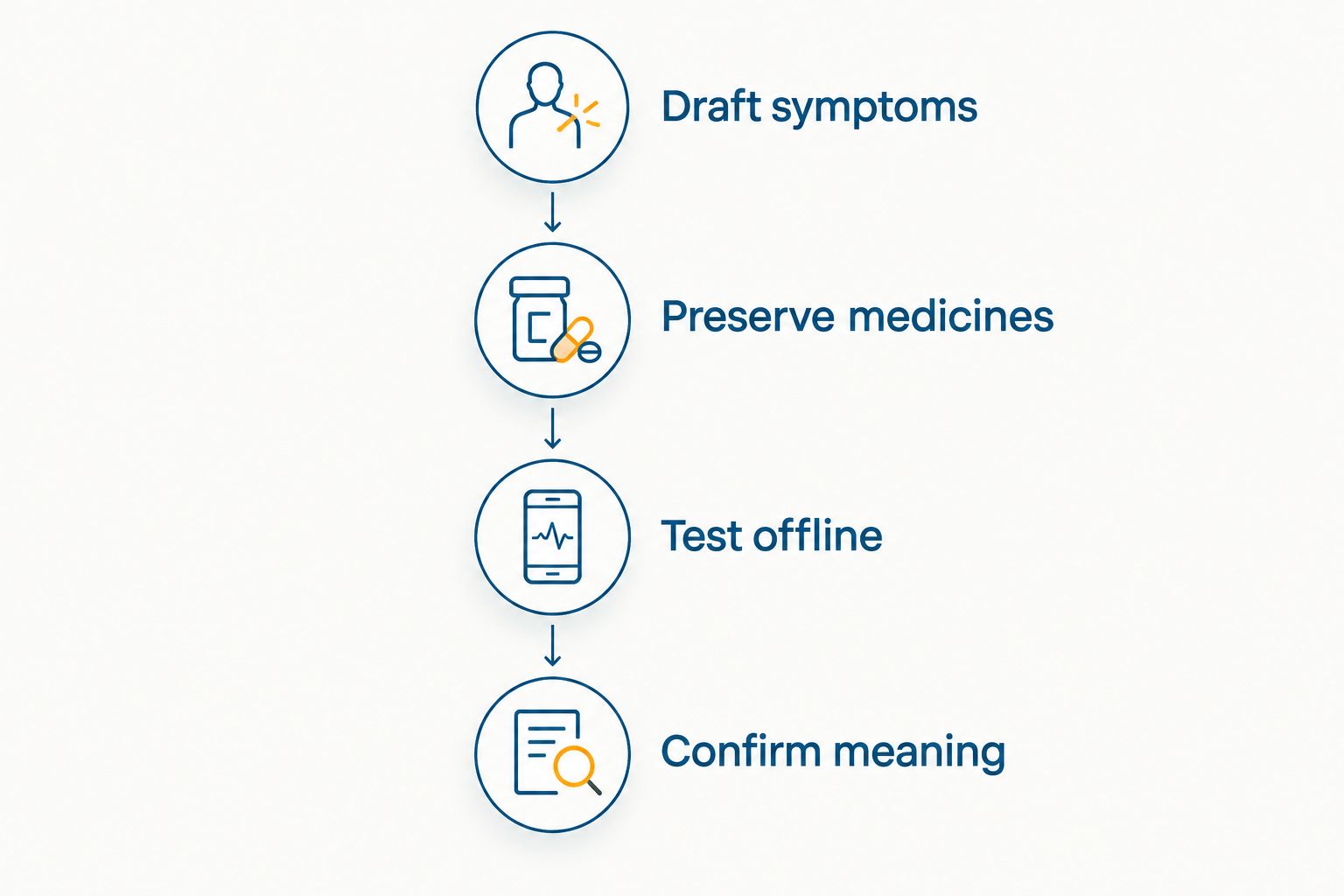
Use this sequence to make the app useful without asking it to act as a clinician.
Draft symptoms
Write 1 symptom per sentence. Describe what you feel, where you feel it, and when it began. Avoid guessing a diagnosis or using idioms that depend on cultural context.
Instead of saying that your stomach is killing you, describe the location and character of the discomfort in plain language. Keep negative statements explicit, especially when describing allergies or symptoms you do not have.
Preserve medicines
Prepare a 1-page medication summary with names, strengths, and the instructions you currently follow. Keep original packaging or prescription information available. Do not convert a dose or replace a medicine name based on a translation app's suggestion.
Include known allergies separately from other medical history. A translated summary supports the conversation; the clinician still needs to confirm the information.
Test offline
Download supported language files and test the functions you plan to use with connectivity disabled. Typing, microphone input, camera input, and conversations can have different requirements.
Save 2 copies of your essential summary: one accessible on your phone and one printed. The paper copy is a backup when the device is unavailable, not an independent check of translation accuracy.
Confirm meaning
Show the original and translated text together. Ask the clinician to confirm important details through an appropriate interpreter when needed, particularly allergies, medicines, and treatment instructions.
Request written instructions you can understand. Do not treat translating a sentence back into its original language as proof that the first translation was accurate.
Which symptom translation app should you choose?
Choose Google Translate as the default for a varied 2026 itinerary. Choose Microsoft Translator when shared conversation is the priority, Apple Translate when its supported iPhone workflow fits, or DeepL when you are preparing written notes.
Do not install several apps and assume their agreement proves accuracy. The more important preparation is a clear original statement, preserved medication information, and a route to qualified language support.
MyAbroadMDs complements symptom translation by helping you prepare a curated English-speaking doctor directory before departure. It does not provide medical interpretation, insurance coverage, telehealth consultations, or appointment booking.
Prepare before you pack
Explore memberships for a personalized, curated directory of English-speaking healthcare providers abroad.
FAQ
What's the best app to translate medical symptoms abroad in 2026?
Google Translate is the default recommendation for travelers who need several translation input methods. Confirm destination-language support and prepare downloaded languages where available; the app is not a medical interpreter.
Can I use a translation app instead of a medical interpreter?
Do not use a general-purpose translation app as your sole interpreter for consequential medical decisions. Request qualified interpretation for consent, diagnosis discussions, and treatment instructions when you do not share a language with the clinician.
Which symptom translation app works without internet?
Google Translate and Apple Translate offer downloaded-language translation for supported languages and functions. Download the required files before departure and test your intended workflow without connectivity.
Is DeepL better than Google Translate for medical symptoms?
DeepL fits prepared written symptom notes, while Google Translate fits a broader mix of travel communication tasks. That workflow distinction is not evidence that either app is more medically accurate.
Should I translate medication names before showing a doctor?
Keep original medication names, strengths, and prescription information available. Translate the surrounding explanation, but ask the clinician to identify the medicine from the original information rather than an app-generated substitute.
Does MyAbroadMDs translate symptoms or book appointments?
MyAbroadMDs provides personalized, curated English-speaking healthcare provider directories through subscription memberships. It is not a medical translation service, insurance, telehealth, or a booking service.
What should I do if symptoms seem urgent abroad?
Seek local emergency care rather than delaying to perfect an app translation. Use short statements to communicate immediate needs and request language assistance from the care team.
One last thing
A translation that comes back looking correct is not proof of medical accuracy. The same ambiguity can survive both directions. Put your effort into a clear original statement and confirmation from the clinician or interpreter—not repeated app comparisons.
Before you pack. Prepare the words, the medication information, and the route to care.