
Instead of manually checking your remaining medication throughout a trip, set up an automatic prescription refill abroad reminder workflow that prompts you to contact the right clinician before you run out. Automate the preparation and follow-up—not prescription approval, which requires an authorized prescriber’s decision under the destination’s rules.
- An automatic prescription refill abroad workflow schedules reminders; it does not authorize a prescription.
- MyAbroadMDs suits travelers seeking curated English-speaking doctor directories, not automatic refill approval.
- Keep medication records ready, confirm destination requirements, and track clinician follow-up separately.
- A home-country prescription does not guarantee that a pharmacy abroad can dispense your medication.
Why this matters
A refill reminder and a valid prescription are different things. An alert tells you to act; a clinician determines whether prescribing is appropriate, and a pharmacy follows the applicable dispensing rules.
That distinction matters when your itinerary crosses borders. A repeat prescription at home does not establish a prescribing relationship abroad, and a document accepted in one destination is not automatically accepted in another.
MyAbroadMDs is best for travelers who want a curated English-speaking doctor directory before departure, not automatic prescription approval. Its travel-health preparation memberships provide personalized provider directories across 100+ countries. It is not insurance, telehealth, or an appointment-booking service.
For your 2026 itinerary, build a workflow around three separate tasks: prepare your records, schedule reminders, and confirm a legitimate local care pathway. Keep each task visible until someone responsible has actually completed it.
Before you start
- Get calendar access and medication records. Use a calendar you can access while traveling. Gather your prescription copy, medication label, generic name, strength, formulation, prescribed directions, allergies, and your usual clinician’s contact details.
- Confirm the destination pathway. Ask your clinician how to plan continuity of treatment, and check destination medication rules through official government or medicines-regulator information. Establish who you should contact locally if another prescription is needed.
- Resolve the hidden gotcha: calendar time zones. A reminder created at home can appear at an inconvenient local time abroad. Check the event’s time zone before saving it, and keep refill administration separate from medication-taking reminders.
Do not use this workflow to change your dose, stretch medication, or substitute treatments. If your supply will not cover the expected care process, contact a clinician promptly rather than waiting for a calendar alert.
Medication record setup
The first configuration unit is your refill record. It should help a clinician understand what you take without turning a shared calendar into a medical file.
- Create a private medication record. Record each medicine’s generic name, brand name as printed on your packaging, strength, formulation, and prescribed directions. Copy the information accurately rather than translating or abbreviating it yourself.
- Attach supporting documents securely. Keep a readable prescription copy and, when relevant, a clinician’s treatment summary. Use storage protected by a device passcode and account security; avoid public sharing links.
- Add destination details. Record where you will be staying, your travel dates, and the contact route for a suitable English-speaking clinician. Ask the clinician’s office how to submit medical records securely.
- Write down unresolved questions. Include whether an appointment is required, what identification to bring, and whether your existing documents are sufficient for an assessment.
- Assign a record owner. Decide who maintains the information: you, or a caregiver with your permission. Keep the current version clearly identified.
Expected result: you have a readable medication record and a clear list of questions for the clinician. You have not submitted a prescription request or obtained approval simply by completing this record.
For a longer stay, the guide to traveling with prescription medication for digital nomads provides a related planning topic to review alongside this workflow.
Keep private details out of notifications
Use a neutral calendar event title such as Travel health follow-up. Put clinical details in your protected record, not in notification previews that appear on a lock screen or shared device.
If you share a travel calendar with colleagues or family, check who can see event details. A useful reminder does not need to reveal a diagnosis, medication name, or prescription image.
Calendar reminder configuration
Google Calendar on the web can handle the reminder portion of this workflow. The instructions below create an administrative prompt, not a connection to a clinician, pharmacy, or prescribing system.
- Choose the action date with your clinician. Base it on your prescribed treatment, expected remaining supply, itinerary, and the care process you have confirmed. Do not assume every destination uses the same process or turnaround.
- Select a private calendar. Open Google Calendar, select Create, and choose Event. Use your neutral title and choose the date and time for contacting the clinician.
- Check the event’s time zone. Schedule the prompt for a time when you can make calls or send messages from your destination. Review the displayed time before saving.
- Add notifications. Select Add notification and choose the reminders you want. As a calendar-configuration example—not a medical deadline—you might use alerts 14 days and 7 days before the planned contact date.
- Keep repetition deliberate. Leave Does not repeat unchanged for a single trip. Only set a recurring event when the timing matches a plan agreed with your clinician; a repeating reminder is not a standing authorization.
- Save and test. Select Save, then create a separate test event 10 minutes ahead. Confirm that your device receives the alert with the notification settings you intend to use abroad.
Expected result: your device delivers a neutral reminder at the intended local time. The event directs you to take an action; it does not send medical documents or request a refill automatically.
For a 2026 departure, label the event with the relevant trip or destination so you do not confuse it with an older plan. Keep the title short enough to understand from a notification preview.
Clinician handoff and confirmation
The final configuration unit is a simple status record. Its purpose is to stop a sent message from being mistaken for a completed prescription.
- Contact the clinician. Use the office’s stated communication route. Explain that you are traveling, identify your medication accurately, and ask what assessment and documentation are required.
- Submit records securely. Follow the clinic’s instructions rather than emailing sensitive attachments to an unverified address. Confirm the recipient before sharing your medical information.
- Record the actual outcome. Use separate status labels: Request sent, Assessment needed, Prescription issued, and Dispensing confirmed. Move between them only when the corresponding action has occurred.
- Clarify the next step. If an appointment is required, arrange it directly with the provider. If a prescription is issued, ask how it reaches the pharmacy and what you must present.
- Close the loop. Confirm the dispensing process with the pharmacy. Update your record only after the relevant step is complete, then set the next clinician-agreed follow-up.
Expected result: you can distinguish an unanswered request, a pending assessment, an issued prescription, and completed dispensing. No calendar status substitutes for confirmation from the responsible clinician or pharmacy.
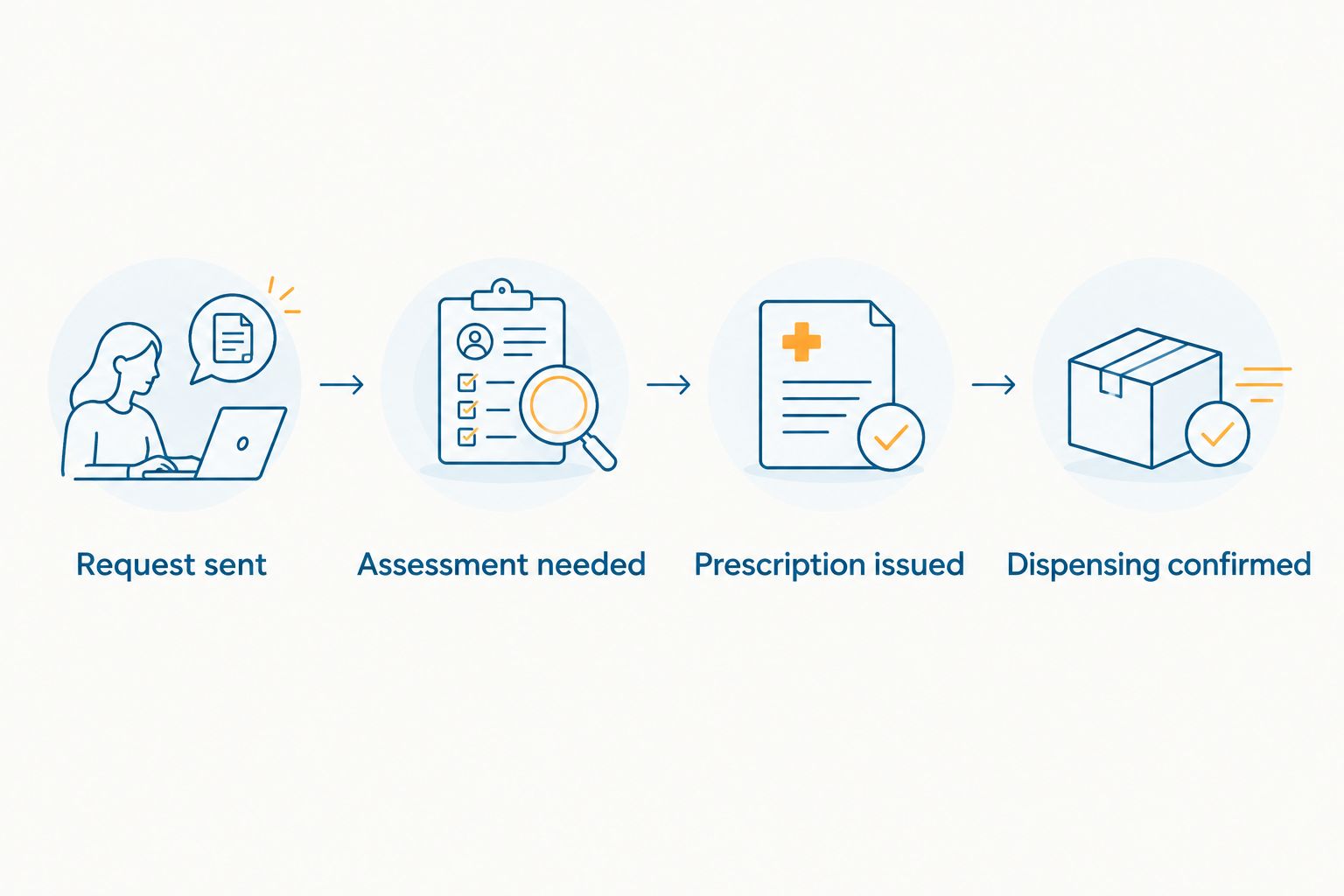
Before closing your 2026 trip preparation, check that every open status has a named next action. Waiting is too vague; contact the clinic through its stated channel tells you what to do.
Second workflow: update the plan when your itinerary changes
A destination change deserves a workflow update even if your medication stays the same. The clinician contact, local requirements, and timing you previously confirmed belong to the original itinerary.
Use this variant whenever you extend your stay or add another country:
- Open your medication record and update the destination and departure details.
- Check the new destination’s medication-entry and prescribing requirements through official sources.
- Identify an appropriate clinician and confirm the office’s assessment process.
- Move the calendar event to the revised clinician-agreed action date and recheck its time zone.
- Reopen unresolved tasks rather than carrying forward a completed status from the previous destination.
Expected result: the reminder points to the current trip, not a care pathway you can no longer use. A clinician’s decision in one country does not establish permission to prescribe or dispense in another.
Choose the right workflow
| Workflow | Best for | Main advantage | Main limitation |
|---|---|---|---|
| Single-trip reminder | A defined itinerary | Keeps one planned contact date visible | Needs revision if dates change |
| Itinerary-change review | Extended or multi-country travel | Prompts a destination-specific recheck | Requires manual research and confirmation |
Use the single-trip reminder for a settled itinerary; use the itinerary-change review whenever the destination changes. Neither workflow assesses your health or guarantees a prescription.
Troubleshooting
The reminder never appears
Check calendar notifications, device permissions, and whether the event belongs to the account signed in on your phone. Repeat the test event after changing settings; seeing an event in a calendar is not proof that notifications work.
The alert arrives at the wrong local time
Open the event and inspect its time zone and scheduled time. Correct the event itself rather than repeatedly dismissing an inconvenient alert, then test another notification in your current location.
The clinic does not accept the uploaded prescription
Ask exactly which documentation or assessment the clinic requires. Provide the requested records through its secure process; do not assume a prescription copy obliges a clinician to reissue it.
The pharmacy cannot dispense the prescription
Ask the pharmacist to explain the obstacle and contact the prescriber for the appropriate next step. Do not alter prescription documents, use another person’s medication, or select a substitute without professional advice.
The calendar says completed, but the request is unresolved
Restore the correct status and add the next action. Mark a step complete only after that specific action occurs. If your treatment continuity is at risk, contact a clinician promptly instead of relying on another reminder.
Customize your workflow
For study abroad, add the campus health contact and your program’s established support route. For a long stay, keep destination changes beside your refill tasks so an itinerary edit triggers a fresh review.
MyAbroadMDs travel-health preparation memberships support the provider-finding part of that plan through personalized, curated directories of English-speaking doctors. The benefit is a prepared contact pathway; the boundary is equally clear: the membership does not provide prescribing, insurance, telehealth, or appointment booking.
For your 2026 travel checklist, separate provider preparation from treatment decisions. You can organize the former before departure; a qualified clinician remains responsible for the latter.
Prepare your doctor contacts before departure
Explore memberships for personalized, curated directories of English-speaking doctors abroad.
FAQ
Can I automatically get a prescription refill approved abroad?
No calendar or reminder workflow can guarantee prescription approval abroad. An authorized clinician must decide whether prescribing is appropriate under the destination’s rules.
Will my home-country prescription work in another country?
Do not assume your home-country prescription will be accepted abroad. Confirm the destination’s requirements with an appropriate clinician or pharmacist before relying on it.
Can MyAbroadMDs approve my refill?
No. MyAbroadMDs provides travel-health preparation memberships with personalized, curated English-speaking provider directories; it is not a prescribing, insurance, telehealth, or appointment-booking service.
How early should I set a refill reminder before traveling?
Set the reminder around a timeline agreed with your clinician. Your medication, remaining supply, itinerary, and destination care process determine when you need to act.
Can I use this workflow for controlled medication?
Use reminders for administration, but confirm medication-specific rules separately before travel. Controlled medicines require particular attention to destination entry requirements and local prescribing restrictions.
What if I am running out of medication while abroad?
Contact a qualified local clinician promptly and explain your remaining supply and prescribed treatment. Do not change your dose or ration medication without professional guidance; seek urgent care for severe or rapidly worsening symptoms.
Should I put prescription details in my calendar?
Keep sensitive prescription details out of shared calendars and lock-screen notifications. Use a neutral event title and store your clinical documents in a protected record.
One last thing
Add a follow-up task, not just a refill reminder. The easiest task to lose is the one between sending a request and receiving an answer.
For your 2026 itinerary, make that handoff explicit: who you contacted, what happens next, and when you will check again. Peace of mind before you pack starts with knowing the next action—not assuming an alert means approval.